




Business Voicemail With Notification | OneSuite Business

Business voicemail

voicemail to email

virtual phone system

forward voicemail

voicemail notification

manage voicemail
mobile app

CUT THE CORD, CUT THE BILL

LANDLINE VOIP PHONE LINE

Just $4.12/month
OneSuite OneLine puts your analog phones on steroid. Make domestic or international calls over Internet anywhere.
Give your a boost!

OneSuite OneLine VoIP Phone Service $49.50/year

INCLUDES ONESUITE ONELINE BOX • PAY-AS-YOU-GO USAGE

What is
OneSuite OneLine?

OneSuite OneLine is the business class VoIP phone line that you can use for your small business or home with your existing analog phone. OneSuite will send you a small adapter box that connects your traditional phone or fax machine to our modern digital phone service via your Internet.

OneSuite OneLine is the most affordable alternative to the landline  or phone service from your  local telephone carrier or cable operator.

Asian Woman on Phone

Pay-As-You-Go VoIP Landline

A Phone Line Cheaper
Than Coffee

For $49.50 per year (that’s $4.12/month), you can have a phone line which you can make US domestic calls and international calls at OneSuite’s great rates.

No calling plan commitments! Your usage charges are pay-as-you-go, deducted from a prepaid credit:

  • Only pay for the calls you make
  • Enjoy unlimited incoming calls
  • No additional taxes or fees

Better yet, OneSuite OneLine comes with all the essential features you expect from a premium phone service. No fluff, just transparent billing.

Essential Features You Love

port-in-img

Number Portability

Keep your existing phone number or pick a new number

Call Waiting

Call Waiting

Ensuring you don't miss important calls while already on the phone

Three Way Calling

Three-Way Calling

Quick collaboration for business meeting or for family plans

Call Forwarding

Call Forwarding

Route incoming calls to another number when busy, no answer, or always

Emergency Services

Enhanced Emergency Service

E911 provides your registered location to first responders for faster assistance

Voicemail to Email

Voicemail to Email

Listen to your voicemail not just on your phone, but also from your email anywhere

Second Phone

Mobile App

Use OneSuite OneLine on-the-go. Like a second phone line via Wi-Fi or data network

International Roaming

No International Roaming Charges

Make and receive calls when you travel abroad with Internet access

Plug and Play

Plug’n Play

Get started instantly with pre-configured OneSuite Box. No technical setup required

Optional
Add-on
OTP

SMS to Email

Receive OTP/2FA globally via email instantly.

Smart Phone App

OneSuite OneLine. Anywhere.

Your OneSuite OneLine is supercharged with our mobile app. As long as you have Internet connection:

  • Make and receive calls
  • Check voicemail in-app
  • Check call history: inbound, outbound, missed
  • Integrates with your phone’s contact list 

We Sweetened the Deal

ATA Box

OneSuite VoIP Box is included.
No extra costs

Tax Included

No additional taxes or
activation charges

Free Shipping

US 50-State
Free Shipping

High Speed Internet

Existing high-speed Internet
service is required
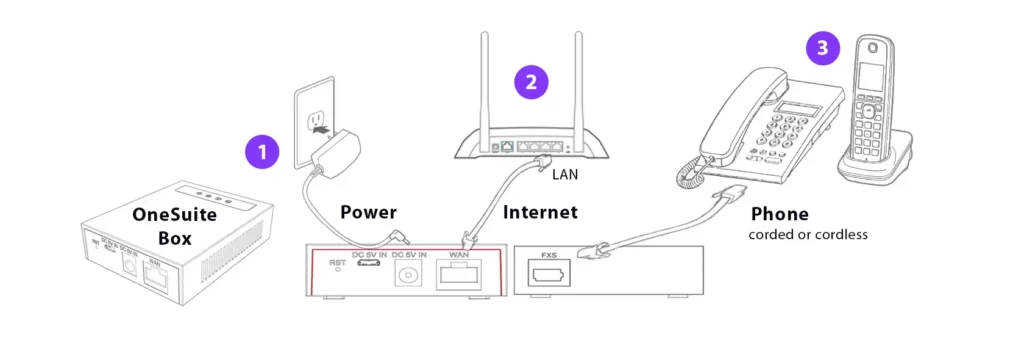
Easy Installation

  1. Connect the OneSuite Phone Adapter Box to a power source
  2. Connect the OneSuite Box to your router or Ethernet wall jack using an Ethernet cable.
  3. Plug your home phone into the OneSuite OneLine Box
  4. Installation is now complete.
ATA Connection Diagram

Ready to Get Started?

FAQs

Can I use my existing IP phone or ATA?

No. OneSuite OneLine only works on OneSuite preconfigured devices. We do not release SIP credentials required for third-party devices.

What if I don’t have an extra Ethernet wall jack?

If you lack a second Ethernet wall jack for your OneSuite Box the best solution is to use an unmanaged Ethernet switch or the Ethernet LAN port from the back of your Wi-Fi- access point.

Can I use Wi-Fi with OneSuite Box?

A wired Ethernet connection is required to use OneSuite OneLine Phone service. The OneSuite Box must be connected to the Ethernet port of a Wi-Fi access point for the service to function properly.

Can I still use OneSuite OneLine if I move to a new address?

Certainly! OneSuite OneLine will work anywhere, as long as it’s plugged into the Internet. Whether you move to a new city, state, or even overseas, OneSuite OneLine will will continue working.

However, you must update the address information in your OneSuite account for E911 to work properly. E911 only works in the United States.

Does the OneSuite OneLine work with cordless phones?

Absolutely! You simply plug the base station of your cordless phone into the OneSuite Box’s phone port (FXS port), connecting the analog signal to the OneSuite digital network. 

Can OneSuite OneLine work with cordless phones with multiple handsets?

Absolutely! To connect OneSuite Box with multi-handset cordless phones, plug the OneSuite Box’s phone port into the main cordless base unit using a standard RJ11 phone cable. The base unit, connected to power, acts as the central hub, allowing additional cordless handsets to pair wirelessly and share the single VoIP line provided by OneSuite OneLine.

How do I make a call using OneSuite OneLine?

Simply pick up the phone and dial the number you wish to reach, like you would with any touch-tone phone.

  • Calling North America: 1 + City or Area Code + Local Number. 
  • Calling Overseas: 011 + Country Code + City or Area Code + Local Number.
How much bandwidth will be required for OneSuite OneLine?

For VoIP calls, we recommend at least 100 kbps upload and download bandwidth per active call.