
OneSuite OneLine
General
How is OneSuite OneLine different from my landline phone service?
The biggest difference is that OneSuite OneLine works over the Internet. It is VoIP phone service. You will get everything you’d expect from a landline, plus the ability to make and receive calls on your mobile when you download our OneSuite Business App.
What type of Internet connection do I need? Is it included in OneLine?
OneSuite OneLine works with any high-speed Internet connection (DSL, fiber broadband or cable broadband). OneSuite does not offer Internet Service, so you’ll need to have your own broadband Internet service in place to use OneLine.
I have multi-handset cordless phones, how many OneSuite Box do I need?
You will need only one single OneSuite Box to connect with the base station of your multi-handset phone system, then all your handsets will be VoIP-ready!
Can I transfer my existing phone number to OneSuite OneLine?
Certainly. Please choose to port-in your phone number at signup.
But before you begin, please meet the following requirements:
You must be the billing contact on your account.
- Customer service record with your current carrier
- A copy of the most recent bill from your current carrier
- Your account must be in good standing (e.g., no freezes, pending orders, contractual agreements, disconnected numbers, etc.) with your current carrier
To begin the porting process:
This can be done upon completion of signup process:
- Login to the administrator portal
- Select the phone number under “Action Required” from the top of the Dashboard (skip to 4) or “Phone Number” from the side vertical menu
- Find the phone number you are porting, which should have the PENDING_DOCS status, click on Edit
- In the pop-up window, click on NUMBER PORTABILITY REQUEST, and fill out the form (information can be found on your current phone bill or provider’s portal).
- Upload most recent phone bill > Continue
- Agree and check all of the consent boxes
- Type your name as e-signature > Submit
Please note: The name on the LOA (Letter of Authorization) must match the name on your phone bill for a successful porting.
The process should take 7-10 business days to complete (pending no rejection)
How long does it take to transfer my number to OneSuite OneLine?
The process should take 7-10 business days to complete (pending no rejection). It’s very important to make sure the name on the LOA (Letter of Authorization) must match the name on your phone bill for a successful porting.
Can I use OneSuite OneLine when I’m overseas?
Certainly! You may take the OneSuite Box with you, or just simply use the OneSuite Business app whenever you have Internet connection.
You may need to purchase a travel adapter if your outlet is not the traditional U.S. 2-pin flat socket. To connect your telephone, you must use an RJ11 phone cable with the same plug on each end. The OneSuite Box can handle any power voltage between 100V and 240V AC.
Can I still keep my U.S. number if I move to another country?
Yes. You can keep your existing U.S. OneSuite OneLine number, even if you move to another country.
Billing & Payment
How is OneSuite OneLine billed?
OneSuite OneLine subscription bills annually.
Your call usage is billed by the per minute rate, deducted from your prepaid account balance. That is why we recommend users to maintain a positive account balance to ensure uninterrupted service.
Where can I find the per minute calling rates for different destinations?
The domestical and international calling rates can be searched by country name + zipcode on our Rate Search page.
How will I be charged when I make calls from overseas using OneLine?
The per minute rates are the same as making the call from the U.S. In fact, you will also be dialing as if you were calling from the U.S., using + country code + zip code + phone number, or 011+ country code + zip code + phone number.
How can I cancel OneSuite OneLine service?
You may login to your OSB OneLine admin portal > account > click the CANCEL button and follow the instructions.
Since OneLine service is annual subscription based, please take notice of our cancellation policy.
OneSuite Box & Installation
What do I do after receiving the OneSuite Box?
Please login to your admin portal > Device > Confirm shipment received
This will activate the OneSuite ATA Box. Then please follow the instruction below to connect the OneSuite Box to Internet and your phone.
How do I install the OneSuite Box and connect with my analog phone?
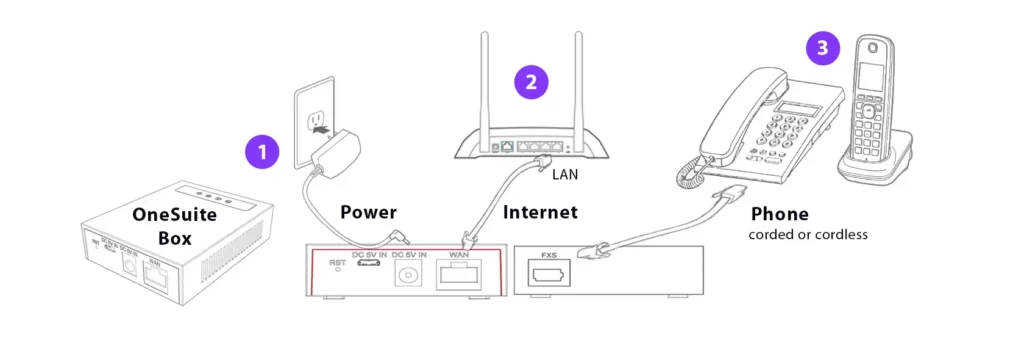
ATA Connection Diagram
- Connect the OneSuite Phone Adapter Box to a power source. The red power light should be lit.
- Connect the OneSuite Box to your router or Ethernet wall jack using an Ethernet cable. A steady green network indicator LED light will be lit. The box will start the initialization process. Once complete, a steady green registration light should be lit.
- Plug your home phone into the OneSuite OneLine Box. A steady green FXS port indicator should be lit. Installation is now complete.
Once all 4 lights are lit, you should be able to make and receive calls.
What do the LED lights on the OneSuite Box mean?
| Type | Icon | LED Light | LED Status |
| Power | ![]() | Steady red | Power supply connected |
| Light off | Not connected to power supply | ||
| Registration | ![]() | Steady green | Registration success |
| Flashing green | Registration failed | ||
| Light off | Unregistered | ||
| Network | ![]() | Steady green | Normal connection |
| Flashing green | Network anomaly | ||
| Light off | Disconnected network cable | ||
| FXS port (phone) | ![]() | Steady green | Calling/alerting/talking |
| Green light flash | Message Waiting Indicator | ||
| Light Off | Standby |

Calls & Calling Features
How do I dial domestic calls using OneLine on my desk phone?
To dial a US domestic call or calls to Canada, please always dial 1+ area code + 7digit number.
How do I dial international calls using OneLine on my desk phone?
Always dial as if you were calling from the US, with a prefix of 011 or use (+) to replace origination country code
011+destination country code + destination area code + destination local number
How do I retrieve my OneLine voicemail from my desk phone?
To access your voicemail box from your OneLine phone, please dial 5001 followed by the voicemail PIN.
*Please make sure your voicemail is enabled. The voicemail PIN can be setup in the admin portal > Mobile App from the side menu > Voicemail tab on the top right > type in new voicemail PIN > Update PIN
How do I use OneLine with my smartphone?
Please download the OneSuite Business App, and login with the credential found in the Mobile App section in your admin portal.
Click on Update Password to setup/update new password.
How do I use the OneSuite Business App?
Please refer to the OneSuite Business App FAQ
Can I take my OneLine Box with me when I travel?
Absolutely. If you’re going somewhere with high-speed internet, make sure you pack your OneSuite Box, because you’ll be able to make calls using your existing U.S. phone number wherever you are.
You may need to purchase a travel adapter if your outlet is not the traditional U.S. 2-pin flat socket. To connect your telephone, you must use an RJ11 phone cable with the same plug on each end. The OneSuite Box can handle any power voltage between 100V and 240V AC.
We recommend updating your location in your Online Account so that if any emergency calls are made, they will be sent to the proper location. Please be reminded the e911 is only available in the U.S.
How do I enable call forwarding for my OneLine number?
Call forwarding of your OneLine number can be set up in the OneSuite Business admin portal > Mobile App from the side menu> Settings tab from the top > ☑ Enable Call Forwarding > enter the destination number.
Please note that the call forwarding features only works for US and Canada destination numbers.
Traveling? Please consider using the OneSuite Business app, which you can make and receive call anywhere there’s high speed Internet.